Icon of program: SyncMate

SyncMate for Mac

  • Free
  • 3.4
    131
  • 204.8K
  • V8.9.563

Sync your Mac with your Android and iOS devices with ease

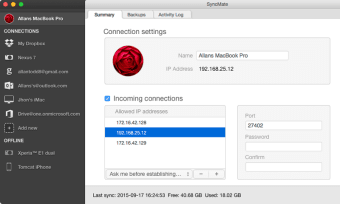
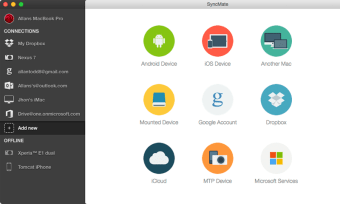
Syncing devices other than Apple products with a Mac can be a problem. SyncMate, however, allows Mac users to sync Android devices, other Macs, USB drives, and online accounts easily.

Top Recommended Alternative

Two delicious flavors

SyncMate is offered in two editions - Free and Expert. SyncMate Free lets you sync your contacts and calendar between your Mac and supported devices/accounts. It can do all of this in the background, and allows data to be shared with Android, iOS, and cloud services.

Expert Edition offers significantly more options, allowing you to sync images, videos, music, bookmarks, SMS, calls, reminders, and other useful options between the previously listed compatitible devices. That said, do note that sync options differ between supported devices and accounts, so check out the handy compatibility list that is available on the SyncMate site.

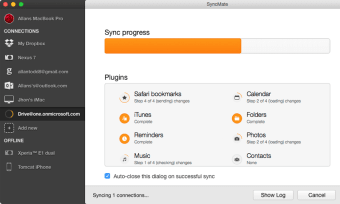
Along with the free background sync option, SyncMate Expert also offers an AutoSync option. This lets you set various parameters for when you automatically sync devices.

Easily organize yourself

The Expert version also syncs folders between your Mac and mounted storage devices, or other Macs, in real time. So, when you change any data on your Mac or connected device, it will be synced immediately.

You can also create, send, delete, search, and export text messages from your Android or iOS device on your desktop.

SyncMate Expert allows you to convert videos to AVI, MPG, MP4, WMV, ASF, or 3GP, and audio files to MP3 and WAV prior to syncing them to device. The Sync process can be performed via USB, Wi-Fi, Bluetooth, and Ethernet depending on the synced device.

All together now

All in all, SyncMate is an excellent tool to synchronize your Mac with any Android and iOS device, as well as offering multiple other options to conveniently organize your data between USB and cloud storage.


  • Pros

    • Syncs seamlessly with Android devices
    • Manages SMS messages
    • Resizes videos
  • Cons

    • Advanced features require expert version
    • Free version doesn't allow you to specify files
    • Free support via e-mail only
 0/3

App specs

Program available in other languages


Icon of program: SyncMate

SyncMate for Mac

  • Free
  • 3.4
    131
  • 204.8K
  • V8.9.563

User reviews about SyncMate

3.4

16 reviews

Add review

Main reviews for you

  • Anonymous user

    Does not connect to an Android phone from an M1 Mac Mini via either USB or WiFi. SyncMate module for Android has to be sideloaded (not in Google Play Store), which is a security risk, and it was built for an older version of Android, which may be why it didn't work, anyway. Not recommended.

  • Anonymous user

    Great for personal data sync. wanted to sync contacts on my MacBook with Galaxy phone and Syncmate did this perfectly. No duplicates or errors. Thanks for making this option free:) Pros: possibility to sync data for freewide range of data you can sync Cons: no complaints for now

  • Anonymous user

    Stay away!. stay away! ruined my extensive contact file by mixing up email addresses, adding calendar dates before and after the original date. it's taken my months to go through and clean it up. ugh.


  • Anonymous user

    Highly recommend!. Highly recommend! I love the app, the interface, the customizing and multiple features.

  • Anonymous user

    Where have you been all my life! . Using Android and Mac for a while, and I can tell you it was a real thing to make these two work together. A year ago came across SyncMate. I've read a lot of comments and had some mixed feeling about this app, but then found a discounted version and got it. If I only knew about it earlier. This thing works great!I had some connections issues but support team helped me and all my problems disappeared.I should warn you, you should check carefully the needed devices, and better do it on publishers website, else, there's a lot of outdated reviews and issues here and there. Pros: Impressive list of featuresWireless connectionAdequate technical support Cons: Paid upgrade policy

  • Anonymous user

    Awful, do not buy.. Awful and they don't offer a refund for their crappy product. I get more functionality with SSH. Pros: NOTHING Cons: Pull off the market

More

You may also like

Alternatives to SyncMate

Explore Apps

Latest articles

Laws concerning the use of this software vary from country to country. We do not encourage or condone the use of this program if it is in violation of these laws.
Softonic

Is SyncMate safe?

100/100

Score result: Clean

This file passed a comprehensive security scan using VirusTotal technology. It is safe to download.

  • Virus free
  • Spyware free
  • Malware free
  • Verified by Security Partners

    VirusTotal logo

Scan Info

Last scan
Tuesday, February 18, 2025
Scan provider
VirusTotal · Full report

File Integrity

File
SyncMate_V8.9.563.dmg
SHA256
0cfc1a4eb1ae3ec5baa494cf0cbb35d7d4ccf43d286a069b588674eed8fa673d
SHA1
0cb7ee63f9b20f30573f90b358d4d1ceb99c314f

Softonic security commitment

SyncMate has been thoroughly scanned by our advanced security systems and verified by industry-leading partners. This file comes from the official developer and has passed all our security checks, showing no signs of viruses, malware, or spyware. For more information, visit our Security and Trust Center